National consistency, one referral at a time
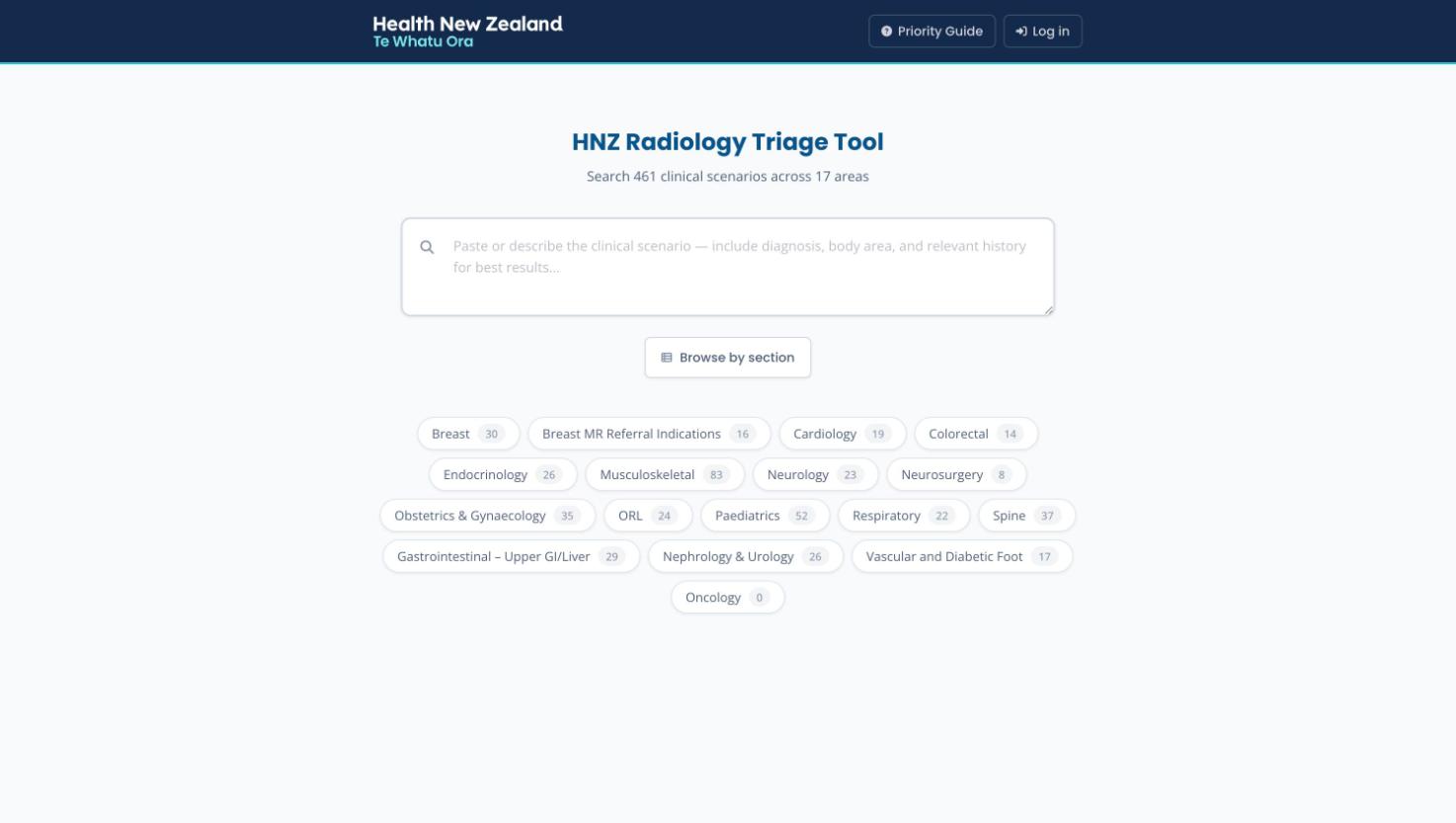
Radiology waiting lists are only fair if the same referral gets the same priority in Invercargill as in Whangārei. The Triage Tool encodes the National Radiology Network's by-clinical-indication criteria as a living, searchable reference.
A scenario library
Hundreds of clinical scenarios written and maintained by section leads, organised into 17 clinical areas — Breast to Vascular — each with modality, priority and guidance comment.
Search-first
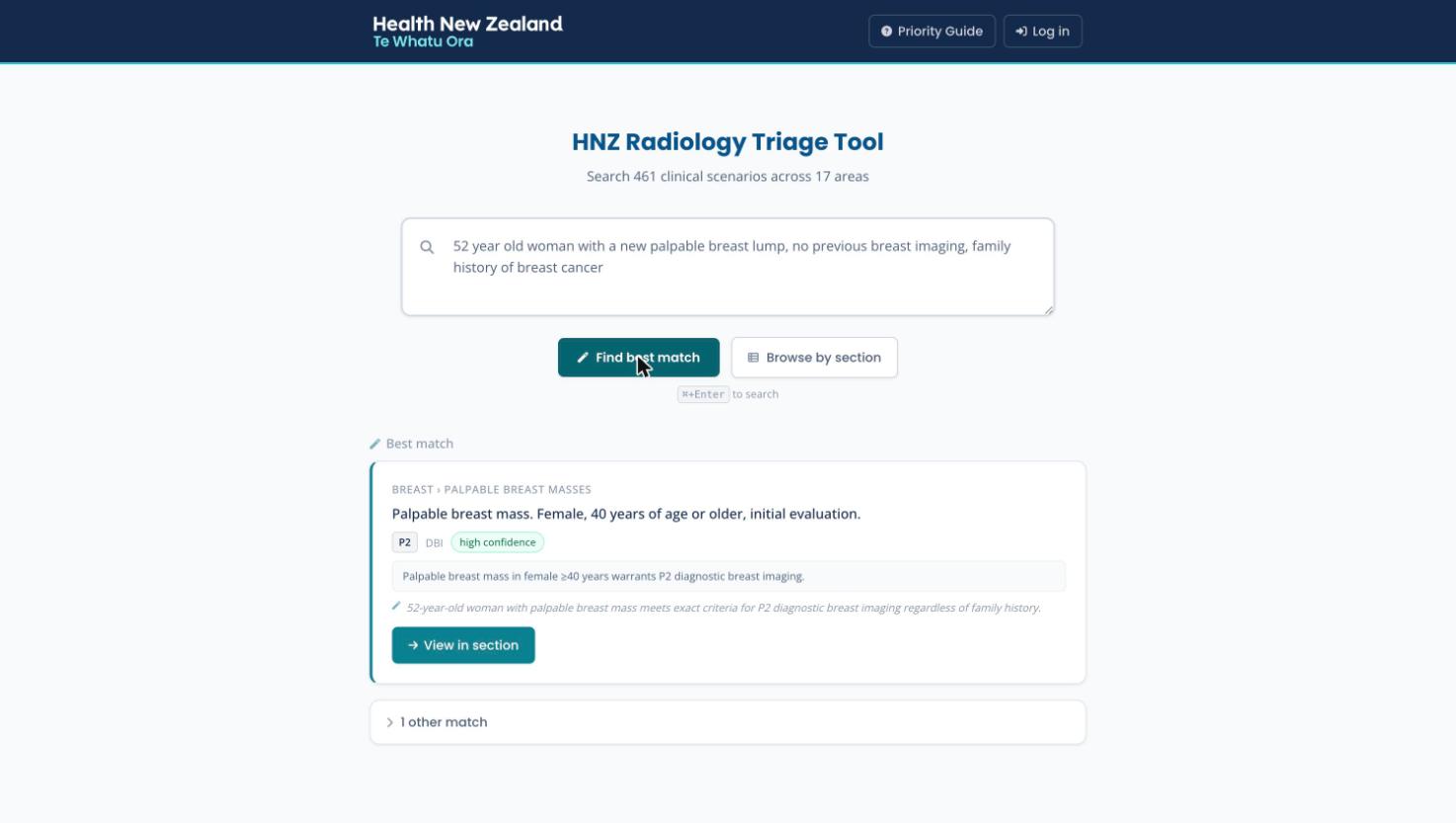
Paste the referral text and let the AI find the best-matching scenario, with a confidence rating and its reasoning — or fall back to fast keyword search and section browsing.
The priority framework
P1–P5, S1–S5 and acute categories with their turnaround targets, plus service disruption levels — the whole national prioritisation guide, one click away.
Scenarios, sections and priorities
Three structures carry the tool: the content hierarchy, the anatomy of a scenario, and the national priority categories.
The content hierarchy
Content is maintained by clinical section leads, whose names sit on every section.
Every scenario has a stable deep link, so a specific recommendation can be shared in an email or pasted into a triage note.
Anatomy of a scenario
The priority categories
P categories run from referral receipt; S categories anchor to a clinically specified target date.
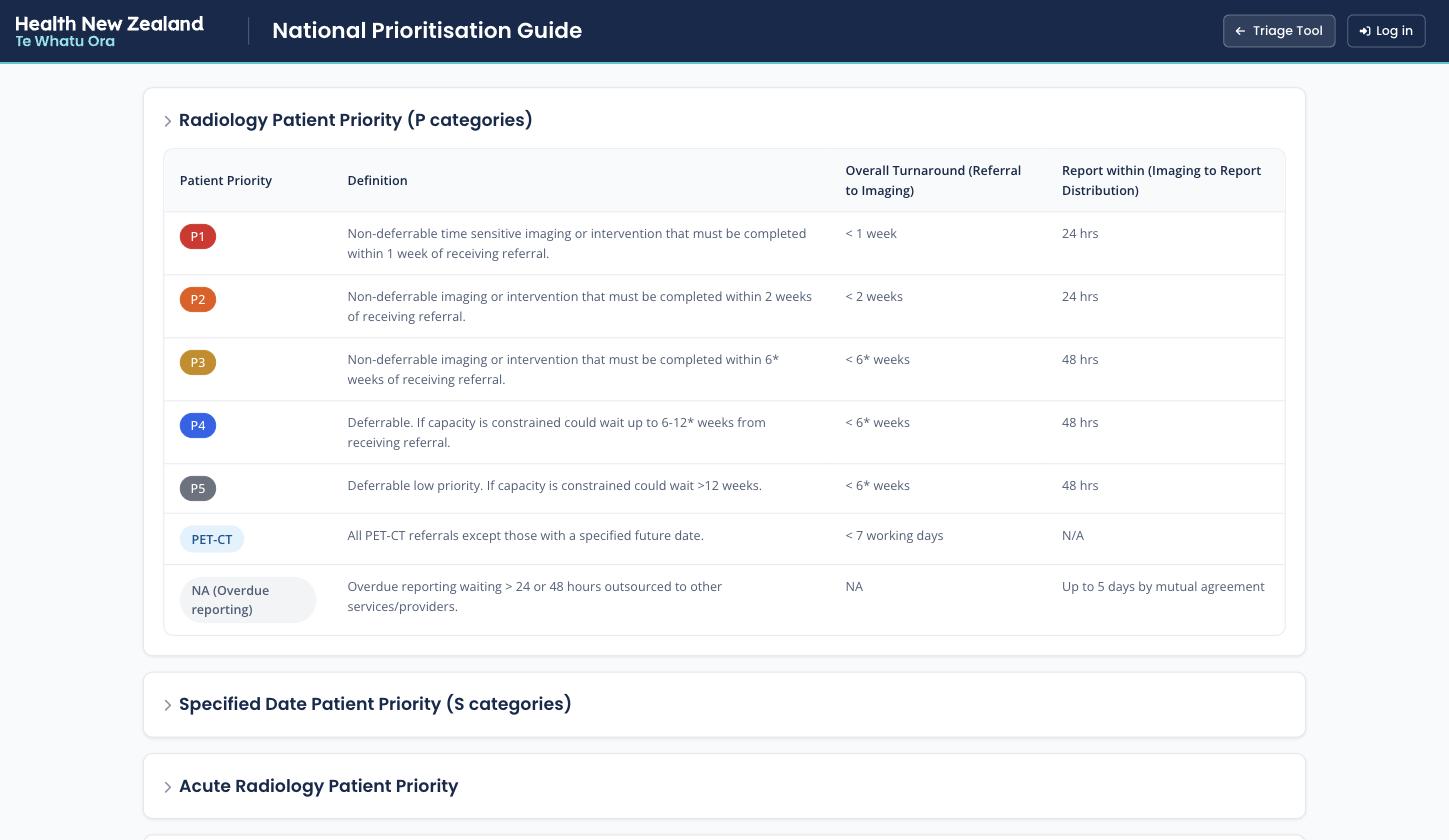
P1 must be imaged within a week; P2 within two; P3 within six; P4 and P5 are deferrable if capacity is constrained. The in-app Priority Guide carries the full definitions and turnaround targets.
From referral text to a priority
Triage is a matching problem: this referral, against hundreds of scenarios. The tool attacks it three ways, from smartest to simplest.
AI best-match
Paste the referral — diagnosis, body area, relevant history — and hit Find best match. An AI model compares the text against candidate scenarios and returns the best match with a confidence rating and a sentence of reasoning, plus runners-up. Unknown abbreviations trigger a prompt asking you to define them; your definitions are contributed back to the shared abbreviation dictionary.
Keyword search
Full-text search across every scenario, ranked with BM25 weighting and expanded with clinical synonyms, with a fuzzy fallback for near-misses — fast enough to run as you type, no AI round-trip needed.
Browse
When you already know the territory, jump straight into a section and scan its subheadings — the classic document reading experience, but structured and always current.
The rest of the surface
Beyond search: browsing, the priority guide, and the editorial machinery that keeps content trustworthy.
Sections & scenarios
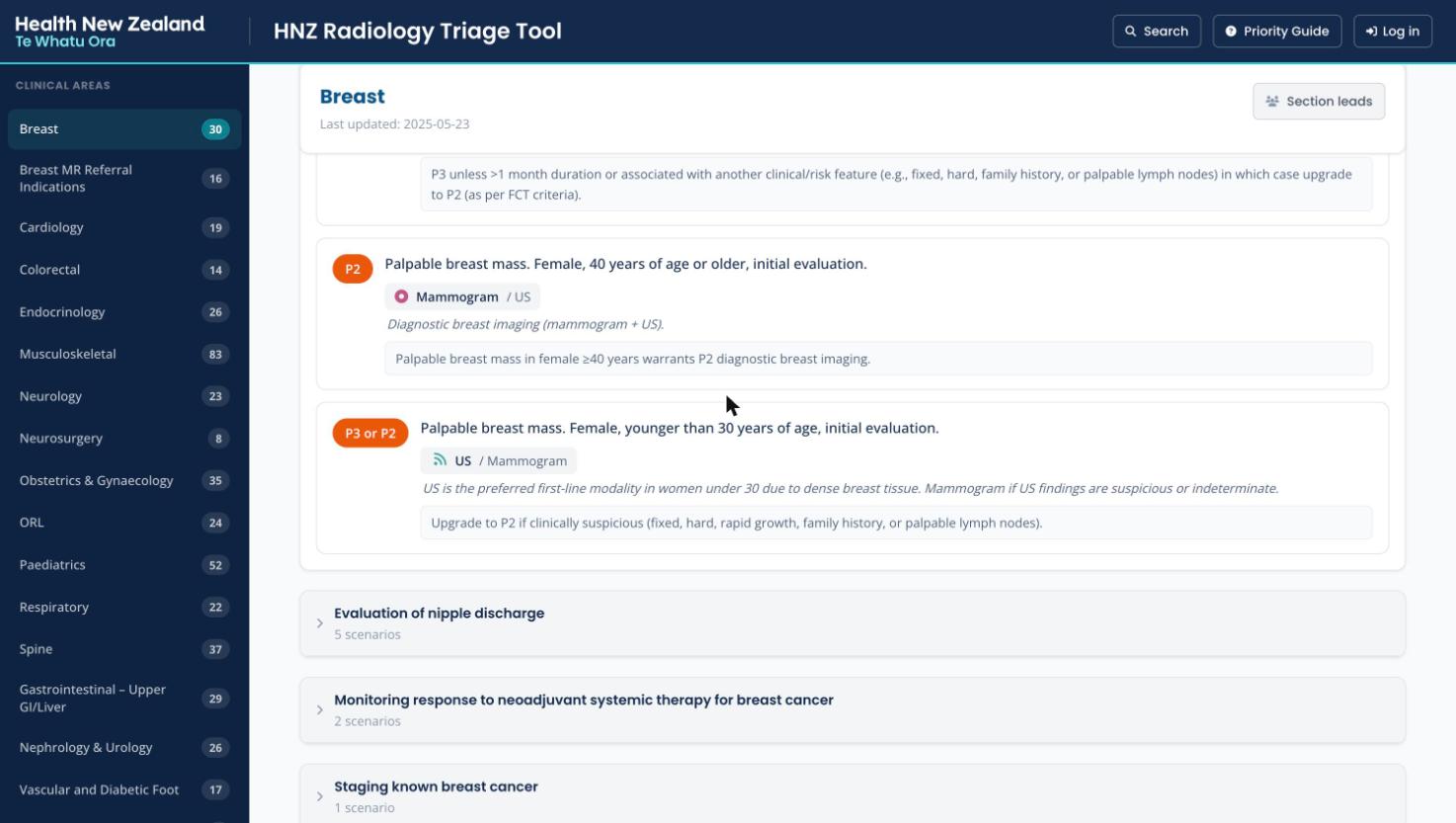
The browse view pairs a clinical-areas sidebar with expandable subheadings. Scenario cards show the priority badge, recommended modality with alternatives, the modality note, and the comment — the full recommendation in one glance.
- Section header shows last-updated date and the section leads
- Deep-linked scenarios scroll into view and highlight
- A compact mode tightens the layout for triage-session use
Priority Guide
The National Prioritisation Guide as a page: full definitions and turnaround targets for P and S categories, the acute priority tiers, service disruption levels 1–4 with their imaging implications, and the reset-and-restore equity rules.
Editor mode
Signed-in editors flip into edit mode from the header and work directly on the live page. The editing model is deliberately conservative — every change is draft-only until an explicit save with confirmation.
- Modality set via tokenised pills from the standard list (CT, MRI, US, XR…) — no free-text drift
- Priority set via P1–P5 / S1–S5 buttons, with adjacent pairs like “P2/P3” supported
- An “imaging not indicated” toggle for scenarios where the right answer is no scan
- Section lead lists are editable per section, so accountability stays visible
From 461 scenarios toward 2,500 — grounded in real referrals
The hand-written library is high quality but covers a fraction of what actually arrives in referral queues. An AI pipeline mines a year of real CT and MRI referral data to propose new scenarios — every one held for section-lead review before patients' care depends on it.
Classify
Claude reads real referrals in interleaved CT/MRI batches, groups them into clinical scenarios, and maps each to the existing section structure — merging the same clinical question across modalities into one scenario.
Deduplicate & consolidate
Similarity matching merges duplicates across batches, then a second, stronger model pass consolidates clinically-equivalent scenarios and rewrites them into professional, matchable wording — ~7,500 raw groupings down to ~2,100.
Filter & tier
Quality gates drop low-confidence output, then scenarios split by evidence: those supported by 3+ independent referrals go to the visible primary tier; thinner ones wait in an editors-only review pool. Three layers of dedup keep the library clean.
Section-lead review
AI-generated scenarios render with distinct amber styling and a badge until a section lead approves them — at which point they become indistinguishable from manual content — or rejects them into a retrievable archive. Nothing AI-written silently becomes doctrine.
Small, fast, and public-facing
Like its siblings, the Triage Tool runs entirely on Cloudflare's edge — which matters more here, because this one is open to every clinician without a login.
Frontend
React 18 + TypeScript · Vite · Tailwind · Cloudflare Pages
- Search-first home, sidebar browse view
- Hash-based deep links to individual scenarios
- HNZ design system, mobile-friendly for ward use
Backend
Cloudflare Worker (Hono) · D1 · R2 · Claude on AWS Bedrock
- SQLite FTS5 full-text index with BM25 column weighting
- Clinical synonym expansion and fuzzy fallback
- AI matching and the scenario-generation pipeline via Bedrock
- Soft deletes throughout — content is archived, never destroyed
main deploys to production, develop to beta —
which is where the AI-expanded library lives until validation completes.